
Instagram Automation
How to Automatically Send a Lead Magnet on Instagram
Learn how to turn an Instagram comment into an automated DM that delivers a lead magnet, tracks the CTA click and follows up when appropriate.
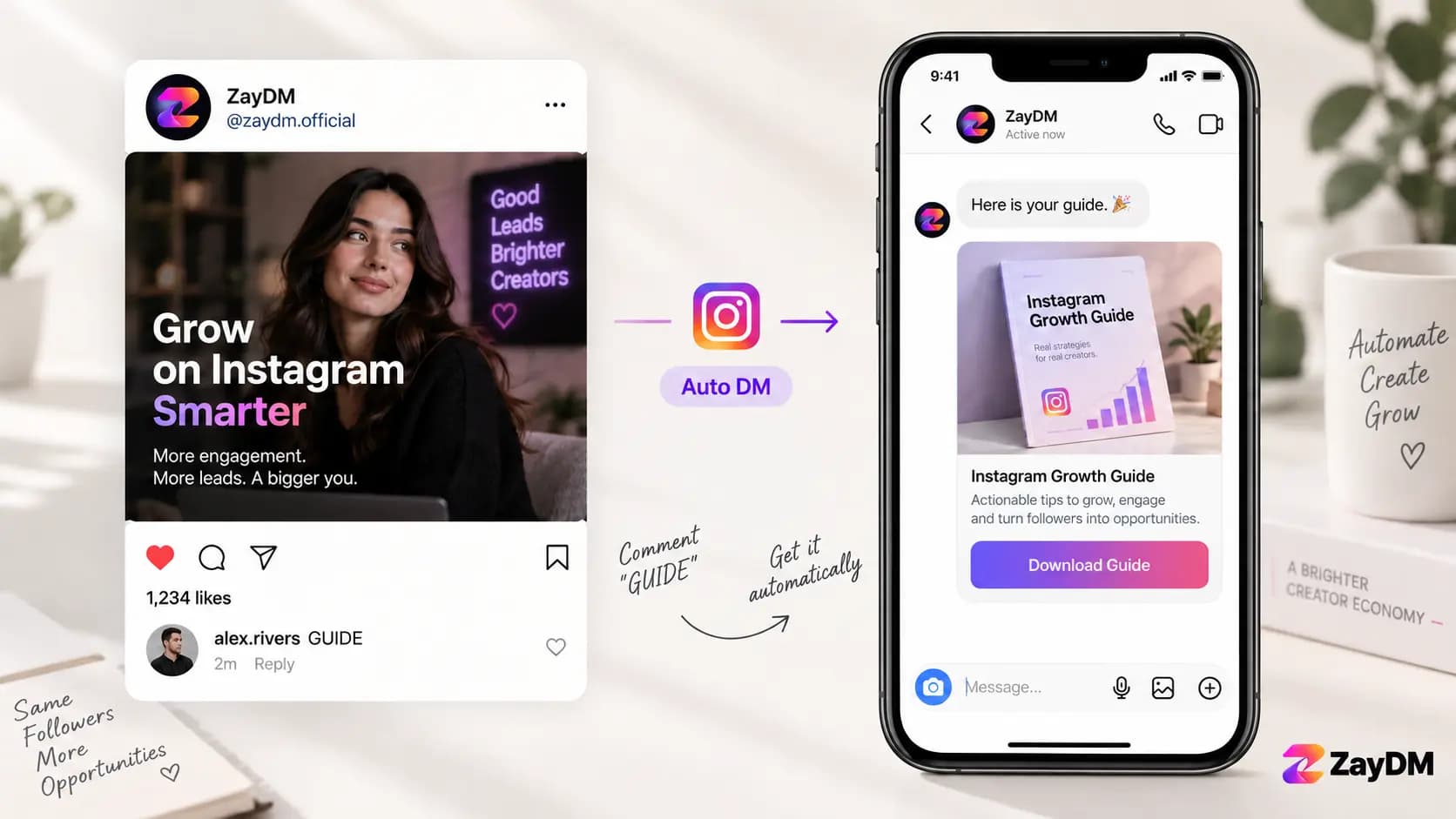
In this guide13 sections
- What is an Instagram lead magnet?
- How Instagram lead magnet automation works
- Step by step: automate an Instagram lead magnet
- Should you use a Follow Gate before the lead magnet?
- How to send a PDF through Instagram automation
- Track whether people actually click the lead magnet
- Follow up when someone does not take action
- Lead magnet examples for different businesses
- Seven lead magnet automation mistakes to avoid
- What should you measure?
- Do you need to collect an email address?
- Frequently asked questions
- Start with one lead magnet
A Reel ends with a simple instruction:
Comment "GUIDE" and I'll send you the checklist.
Someone comments GUIDE.
Instead of waiting for you to notice the comment and manually send the same resource again, an Instagram automation starts the private conversation and delivers what they requested.
That is one of the most practical ways to use an Instagram lead magnet.
A useful workflow can be as simple as:
Post or Reel → Comment keyword → Automated DM → Lead magnet delivered → CTA click tracked → Follow up when appropriate
The important part is not the automation itself.
The important part is shortening the distance between someone's interest and the resource you promised.
What is an Instagram lead magnet?
A lead magnet is something useful you give someone in exchange for their attention or a next step in the relationship.
It does not have to be a 42-page ebook.
On Instagram, useful lead magnets can include:
- a checklist
- a PDF guide
- a template
- a worksheet
- a product guide
- a size guide
- a menu
- a calculator
- a swipe file
- a resource list
- a short training
- a booking preparation guide
- a downloadable document
- a useful page on your website
The best lead magnet normally solves one small, specific problem.
A broad promise like:
Everything you need to grow your business
is harder to understand than:
The 10-point Instagram Reel checklist I use before publishing.
Specific resources make the CTA easier to understand and make the automation easier to build.
How Instagram lead magnet automation works
There are two parts to the workflow.
The public content creates interest.
The private conversation delivers the next step.
A typical Instagram lead magnet flow looks like this:
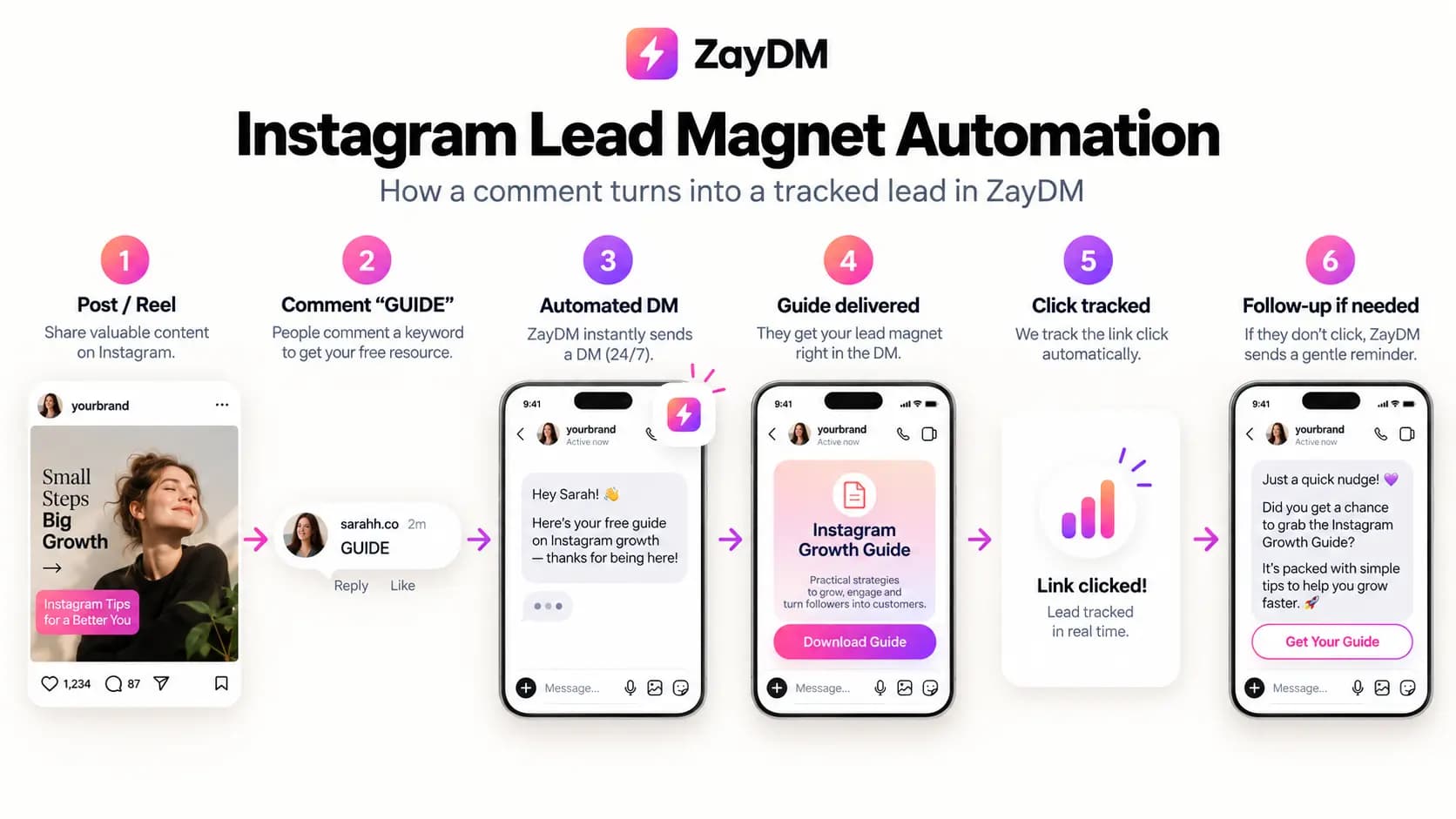
Someone sees your post or Reel, comments the keyword you asked for, and the automation starts.
From there, the exact flow depends on how much interaction you want before delivering the resource.
A simple version might be:
Reel
↓
Comment "GUIDE"
↓
Automated DM
↓
Guide CTA
↓
Resource opens
A more structured version could be:
Reel
↓
Comment "GUIDE"
↓
Opening Message
↓
Continue
↓
Optional Follow Gate
↓
Guide delivered
↓
Click tracked
↓
Follow up if appropriate
Neither version is automatically better.
The right version is the shortest flow that accomplishes what you actually need.
If you want a deeper explanation of the trigger itself, read How to Automatically DM Someone Who Comments on Instagram.
Step by step: automate an Instagram lead magnet
Step . Choose one useful resource
Start with the lead magnet itself.
Ask a simple question:
What does the person get after commenting?
The answer should be obvious.
For example:
- Instagram caption checklist
- restaurant catering menu
- home-buying preparation guide
- product sizing chart
- client onboarding template
- workout planner
- content calendar
- pricing guide
Avoid building the automation first and then searching for something to put inside it.
The offer is the reason someone comments.
Automation only delivers it.
Step . Choose a clear comment keyword
Use a keyword that naturally matches the resource.
If you are giving away a guide:
Comment GUIDE and I'll send it.
If it is a checklist:
Comment CHECKLIST and I'll send you a copy.
If it is a menu:
Comment MENU and I'll send it to your DMs.
Good keywords are usually:
- short
- easy to spell
- connected to the promise
- distinctive enough to avoid accidental triggers
You do not need a clever keyword.
You need one people can understand immediately.
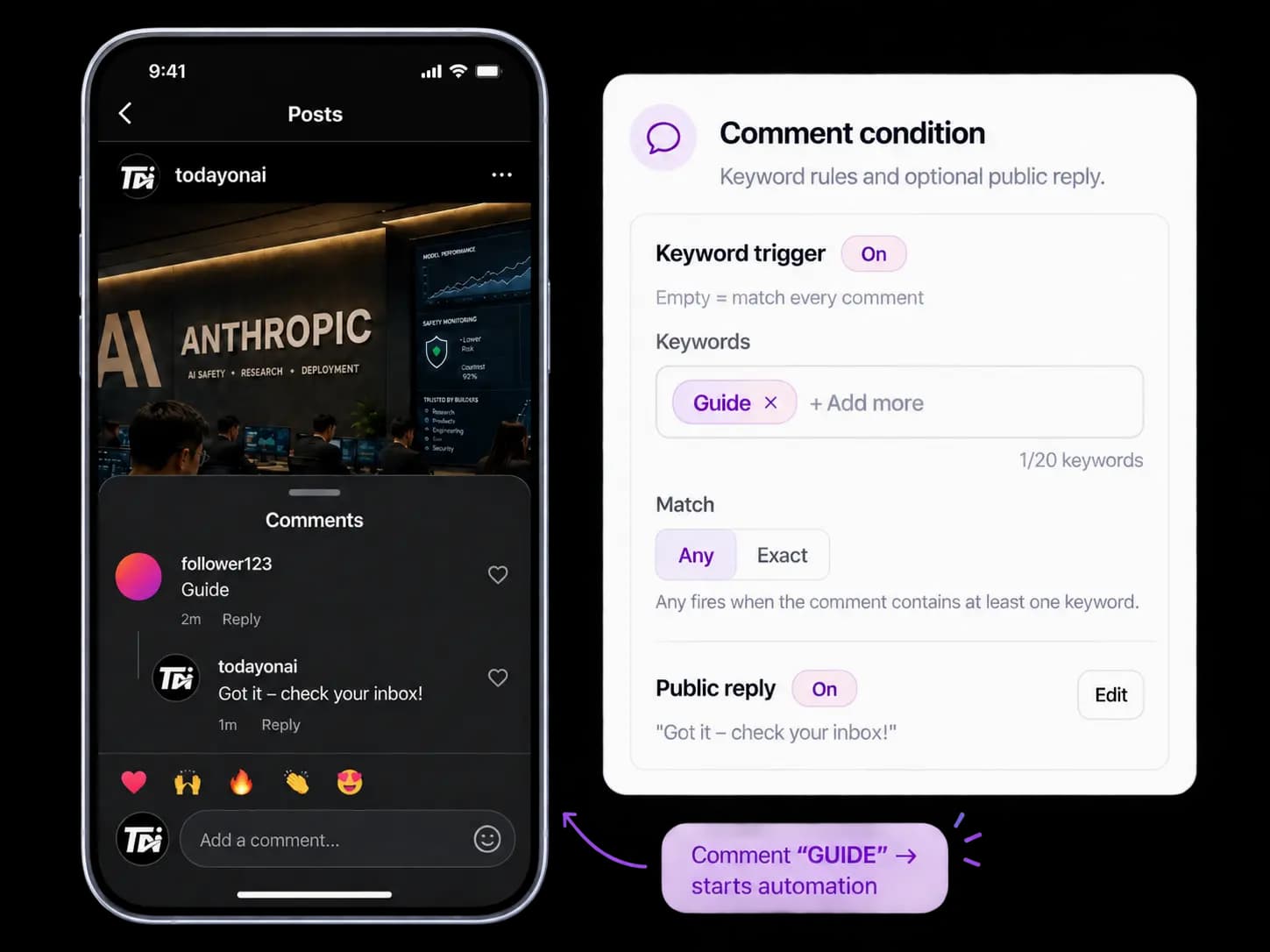
Step . Create the Comment automation
In ZayDM, create a Comment automation for the Instagram account you want to use.
Choose the content and comment conditions that should trigger the workflow.
For a simple lead magnet campaign, that might mean:
Keyword: GUIDE
Then make sure the CTA in the post uses the same word.
Do not tell people to comment GUIDE while configuring your automation to look for DOWNLOAD.
Consistency matters.
For the full product setup, use the Comment Automation guide.
ZayDM product
Step . Decide what should happen before delivery
You do not always need a long opening sequence.
If someone asked for a resource, the automation should quickly acknowledge that request.
For example:
I have the guide ready for you. Tap below to continue.
If you use an Opening Message in ZayDM, the remaining flow waits until the person chooses to continue.
You can also configure an optional Follow Gate when that fits the campaign.
The key word is optional.
Every additional step creates friction. Add a step because it serves the campaign, not because the automation editor gives you another switch to turn on.
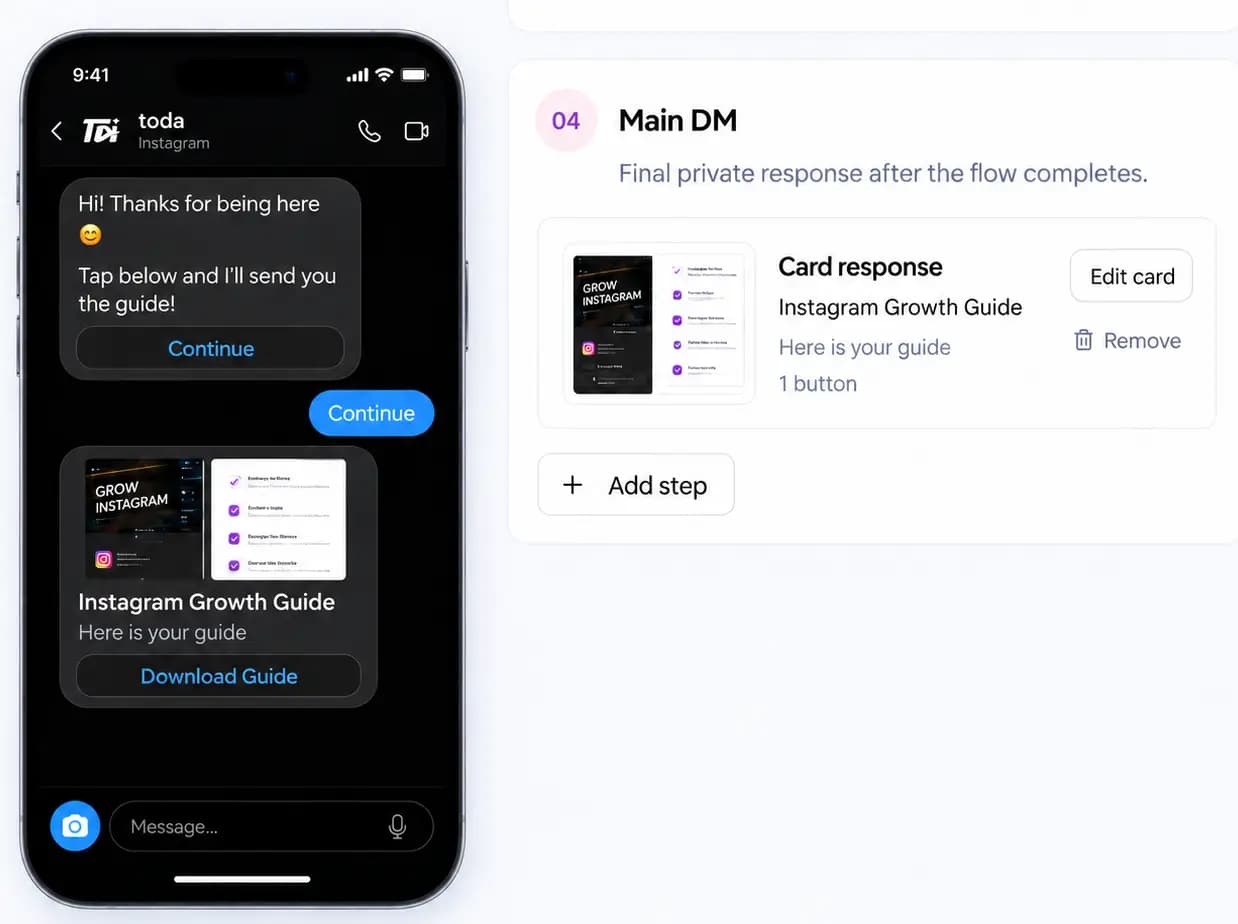
Step . Deliver the lead magnet in Final Response
Final Response is where the promised resource should arrive.
In ZayDM, you can use a Text Message or Card Message with a CTA button.
For an HTTPS resource, use a link destination.
For supported documents, you can also use Upload file for:
- DOC
- DOCX
with a maximum file size of 10 MB.
Keep the CTA obvious.
Examples:
- Download Guide
- Get Checklist
- View Menu
- Open Template
- See Size Guide
Avoid vague CTA labels such as:
Learn More
when the person specifically asked for a guide.
ZayDM product
Step . Test the complete journey
Before promoting the post, test it from another Instagram account.
Check the experience in order:
- Leave the comment.
- Confirm the automation triggers.
- Open the DM.
- Complete the Opening Message if you use one.
- Confirm the Final Response arrives.
- Tap the resource CTA.
- Confirm the correct page or file opens.
Do not test only inside the editor.
The real experience happens inside Instagram.
Should you use a Follow Gate before the lead magnet?
Sometimes.
But do not treat it as a requirement for every lead magnet.
A Follow Gate can make sense when growing the account is part of the campaign goal. In ZayDM, it can check follow status before the Final Response is delivered.
But think about the promise you made publicly.
If the Reel says:
Comment GUIDE and I'll send you the guide.
and the DM suddenly introduces several unexpected conditions before delivering it, the experience can feel different from what the person expected.
If following is part of your campaign, make the CTA clear.
For example:
Follow the account and comment GUIDE. I'll send you the checklist.
That is more transparent than introducing the requirement after someone has already commented.
How to send a PDF through Instagram automation
A PDF is one of the most common lead magnet formats, but it is not the only option.
With ZayDM, a supported document can be used as the destination for a Final Response CTA through Upload file.
Supported document types include:
- DOC
- DOCX
up to 10 MB.
The recipient sees the CTA in the Instagram conversation and can open the delivered resource from there.
You can also point the CTA toward an HTTPS page you control.
That can be useful when the resource lives on:
- your website
- a landing page
- a resource library
- a product page
- a booking page
The important part is testing the final destination before launching the campaign.
A perfectly configured Instagram automation that sends people to a broken file is still a broken campaign.
Track whether people actually click the lead magnet
Comments tell you that someone responded to the CTA.
DM delivery tells you that the automation ran.
Neither tells you whether the person actually opened the resource.
That is where Link Click Analytics becomes useful.
When an eligible Final Response contains a supported HTTPS CTA button, ZayDM can track eligible clicks on that CTA.
You can then see metrics such as:
- Link clicks
- CTR
- performance by automation
Click tracking works independently of Smart Follow-Ups.
You do not need to create a No-Click Reminder just to track an eligible Final Response CTA.
ZayDM product
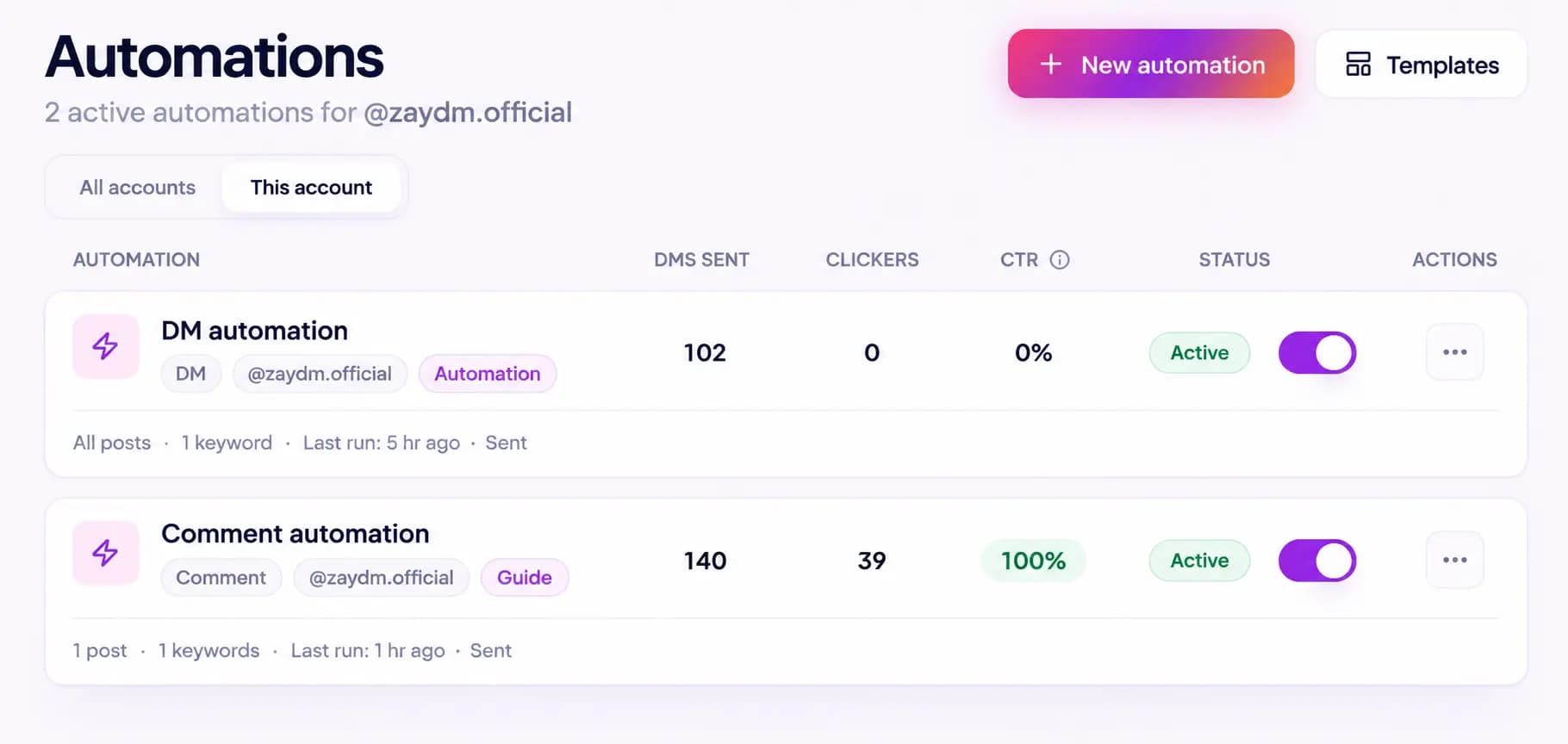
There is an important distinction here.
A click means the person clicked the tracked CTA.
It does not automatically mean they:
- purchased something
- booked a call
- became a customer
- read the whole resource
- generated revenue
Good analytics should describe the action that actually happened.
For the exact tracking behavior, read How link click tracking works.
Follow up when someone does not take action
Someone can request a lead magnet with genuine interest and still get distracted.
They might comment while commuting, receive the DM during a meeting, or plan to open the resource later.
A follow-up can help.
A barrage of follow-ups usually does not.
ZayDM's Smart Follow-Ups can continue the conversation after the Final Response.
One option is a Remind if they don't click step.
Because Link Click Analytics already records eligible Final Response CTA activity, the No-Click Reminder can use that click state when deciding whether the reminder should still send.
Conceptually:
Lead magnet delivered
↓
Did the person click?
↓
YES → Do not send the No-Click Reminder
NO  → Reminder can remain eligible
A normal scheduled Send a follow-up step behaves differently. It is not automatically suppressed simply because the CTA was clicked.
And if the person sends a genuine Instagram DM or story reply, pending Smart Follow-Ups stop according to the follow-up cancellation rules.
That distinction keeps automation from continuing blindly after the recipient has already started a real conversation.
Lead magnet examples for different businesses
You do not need to sell an online course to use this workflow.
| Business | Lead magnet | Keyword | CTA example |
|---|---|---|---|
| Creator | Editing checklist | EDIT | Comment EDIT and I'll send my checklist |
| Coach | Discovery-call preparation guide | GUIDE | Comment GUIDE for the worksheet |
| Consultant | Audit checklist | AUDIT | Comment AUDIT and I'll DM it |
| Ecommerce | Product sizing guide | SIZE | Comment SIZE and I'll send the guide |
| Agency | Content calendar template | CALENDAR | Comment CALENDAR for the template |
| Restaurant | Catering menu | MENU | Comment MENU and I'll send it |
| Local service business | Preparation checklist | CHECKLIST | Comment CHECKLIST and I'll DM you a copy |
The format changes.
The underlying structure does not:
Content creates interest → keyword expresses intent → DM delivers something useful.
Seven lead magnet automation mistakes to avoid
Making the resource too broad
A focused checklist is often easier to understand than a giant resource promising everything.
People should know why they want it before they comment.
Using a vague CTA
Comment below if you're interested.
Interested in what?
Compare that with:
Comment GUIDE and I'll send the checklist.
The second instruction is much easier to act on.
Delaying the resource unnecessarily
If someone asks for a guide, do not make them navigate through an unrelated mini funnel before they can access it.
Every step should have a reason.
Hiding unexpected conditions
If the campaign asks people to follow before receiving the resource, communicate that clearly rather than surprising them inside the DM.
Writing too much in the first message
The recipient already took an action.
You do not need another five paragraphs convincing them that the free checklist they just requested is valuable.
Acknowledge the request and make the next step obvious.
Ignoring the destination
Always test the resource CTA.
Check it on a real phone.
Make sure the file exists, the HTTPS page loads, and the recipient lands where you intended.
Treating every click as a conversion
Link clicks are useful.
They are not the same as sales.
Keep downstream business outcomes separate from DM click metrics.
What should you measure?
A useful lead magnet funnel has several stages:
People see the content
↓
People comment
↓
Automation triggers
↓
Final Response is delivered
↓
Tracked CTA is delivered
↓
People click
↓
People take the next business action
Each metric answers a different question.
Comments tell you whether people responded to your public CTA.
Triggered automations tell you whether the configured rule matched.
Messages sent tell you whether the automation delivered messages.
Tracked CTA deliveries give Link Click Analytics an eligible delivery population.
Link clicks tell you how many eligible taps were recorded.
CTR tells you the share of tracked Final Response deliveries that recorded at least one eligible click.
Your final business result might happen outside ZayDM.
For example, the CTA may send someone to a booking platform, store, checkout or external signup page.
Do not force one metric to answer every question.
Do you need to collect an email address?
Not necessarily.
A lead magnet is often associated with email capture, but the Instagram workflow itself can still be useful even when the first goal is simply delivering a resource and starting a relevant conversation.
Decide what information you genuinely need for the business outcome.
Do not add fields or questions simply because traditional landing pages do.
If the actual goal is:
Give someone the guide they requested and let them continue the conversation.
then build that experience first.
Frequently asked questions
Can I automatically send a lead magnet when someone comments on Instagram?
Yes. With a professional Instagram account and a compatible automation platform, a qualifying comment can start an automated private messaging workflow.
For example, someone can comment GUIDE and receive the configured DM flow.
Can I send a PDF through an Instagram DM automation?
With ZayDM, a Final Response CTA can use Upload file for supported PDF, DOC and DOCX files up to 10 MB.
You can also send a supported HTTPS CTA that points to a resource hosted elsewhere.
Can I use this with Instagram Reels?
Yes. Comment automation can be used with eligible Instagram content, including Reels, depending on the post targeting configured for the automation.
Do I need a Business account?
You need a professional Instagram account. ZayDM supports the Instagram connection flow for Business and Creator accounts.
Should I require someone to follow before sending the lead magnet?
It depends on your campaign.
If you use a Follow Gate, make sure the public CTA sets an honest expectation. Avoid turning a simple resource request into unnecessary friction.
Do I need Smart Follow-Ups for click tracking?
No.
Eligible supported Final Response CTA clicks can be tracked independently of Smart Follow-Ups.
Smart Follow-Ups can then use that click state when you configure features such as Remind if they don't click.
What happens if the person clicks the resource more than once?
Eligible repeated taps can increase the Link clicks total.
For CTR, the tracked Final Response delivery still counts once as a clicked delivery after at least one eligible click.
What if the person replies to the DM?
A genuine recipient DM or story reply can stop pending Smart Follow-Ups according to ZayDM's follow-up cancellation rules.
That lets a real conversation take priority over scheduled generic reminders.
Can I track whether the person buys after clicking?
ZayDM's Link Click Analytics tracks eligible CTA click activity.
It does not claim that a click is a purchase, booking, revenue event, or other action that happens after the redirect.
Start with one lead magnet
Do not begin by trying to automate every piece of content on your Instagram account.
Pick one resource people actually want.
Choose one clear keyword.
Publish one useful post or Reel.
Build the shortest reasonable path between:
"I want that"
and:
"Here it is."
Then measure what happens.
If people comment but do not continue into the DM, inspect the opening experience.
If the resource is delivered but few people click, inspect the CTA and the resource promise.
If people click and start asking questions, that is no longer just an automation metric.
You have created a conversation.
That is the point of a useful Instagram lead magnet workflow: remove unnecessary friction between someone's interest and the next useful action.